1.0 Before you Start
This manual is created to provide guidance and reference to the users of CrewCard, it gives users a depth of understanding its functions and capabilities.
Key
All functions are marked with the following letters that indicate that only these user types have access to that particular page/action.
| Key | User Type |
| A | Administrator |
| C | Crew |
| CL | Client |
| DM | Duty Manager |
| M | Manager |
CNB – Central Navigation Bar
Central Navigation Bar is on the top of the page.
Hover your mouse over the icons to show dropdown menu lists. See sample below:
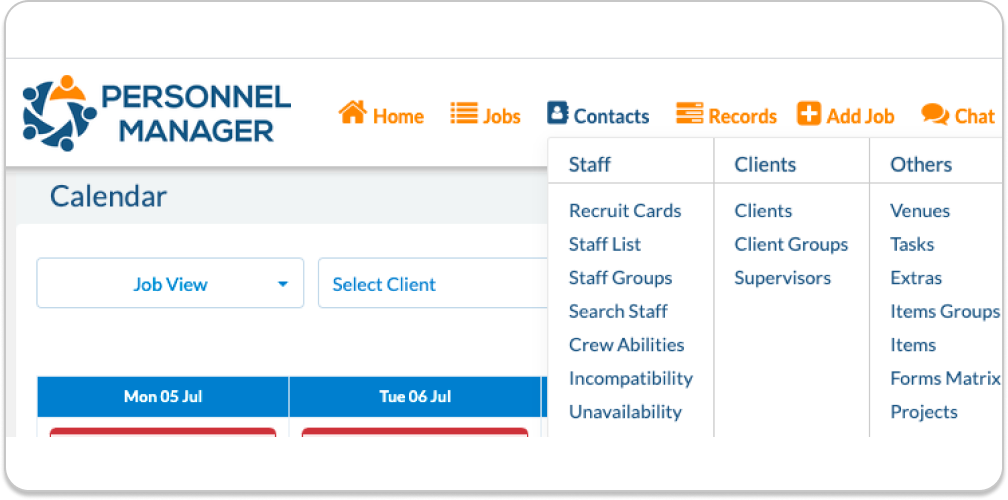
Drop Down Menu Features: Jobs
| Daily |
| Jobs |
| Shifts |
| Calendar |
| Staff |
| Weekly |
| Graphs |
| Events |
| Maps |
| Statistics |
| Deleted |
Contacts
| Staff | Client | Other |
| Recruit cards | Client | Venues |
| Staff List | Client Groups | Tasks |
| Staff Group | Supervisors | Access Levels |
| Search Staff | Extras | |
| Crew Abilities | Items Groups | |
| Incompatibility | Items | |
| Unavailability | Forms Matrix |
Records
| Messages | Utilities | Logs |
| Credits: 4425 | Processes | Shift History |
| Send an SMS | Inductions | App Activity |
| MESSAGE Logs | Projects | |
| Chat Logs | Instructions | |
| Bulk Email | Job Templates | |
| Purchase Credits |
Add Job will route you to Add Job screen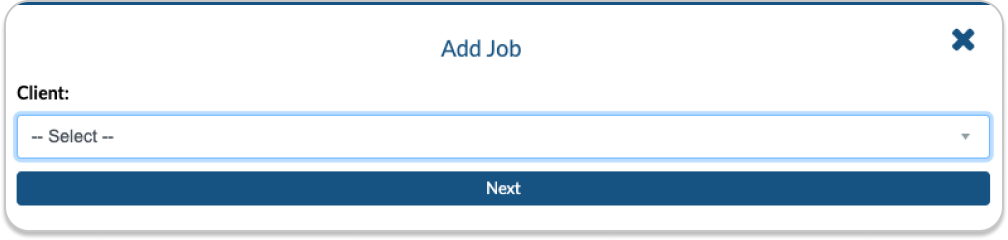 AM – Administration Menu Located on the upper right corner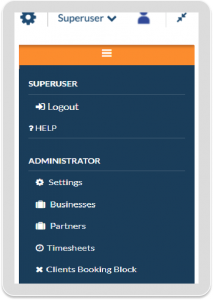
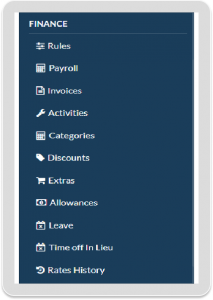 Contains links to the following pages:
| SUPERUSER | Administrator | Finance | View All Business |
| Logout | Settings | Rules | On/Off |
| Help | Businesses | Payroll | |
| Partners | Invoices | ||
| Timesheets | Activities | ||
| Clients Booking Block | Categories | ||
| Discounts | |||
| Extras | |||
| Allowances | |||
| Leave | |||
| Time off In Lieu | |||
| Rates History |